do
$$
declare
    _f_user int = 63; -- это идентификатор пользователя из таблицы core.pd_users: 63 - Милютин, 59 - Телегин
    _d_date timestamptz = now();
    _n_longitude numeric(19, 6) = 47.2279506;
    _n_latitude numeric(19, 6) = 56.1484872;
    _c_network_status text = 'online';
begin
    insert into core.ad_tracking (fn_user, d_date, n_longitude, n_latitude, c_network_status)
    values(_f_user, _d_date, _n_longitude, _n_latitude, _c_network_status);
end;
$$
language plpgsql;
Рубрика: postgresql
Как узнать размер таблиц в postgresql
SELECT nspname || '.' || relname AS "relation", pg_size_pretty(pg_total_relation_size(C.oid)) AS "total_size"
FROM pg_class C
LEFT JOIN pg_namespace N ON (N.oid = C.relnamespace)
WHERE nspname NOT IN ('pg_catalog', 'information_schema') AND C.relkind <> 'i' AND nspname !~ '^pg_toast'
ORDER BY pg_total_relation_size(C.oid) DESC
LIMIT 100;
Поиск медленных запросов
Задача
Необходимо найти долговыполняющиеся запросы к базе данных.
Решение
Необходимо включить вывод в лог запросов, длительность которых больше заданной длительности.
Читать далее «Поиск медленных запросов»Обслуживание PostgreSql
Examples
In the examples below, [tablename] is optional. Without a table specified, VACUUM will be run on available tables in the current schema that the user has access to.
- Plain VACUUM: Frees up space for re-use
VACUUM [tablename]
- Full VACUUM: Locks the database table, and reclaims more space than a plain VACUUM
/* Before Postgres 9.0: */
VACUUM FULL
/* Postgres 9.0+: */
VACUUM(FULL) [tablename]
- Full VACUUM and ANALYZE: Performs a Full VACUUM and gathers new statistics on query executions paths using ANALYZE
/* Before Postgres 9.0: */
VACUUM FULL ANALYZE [tablename]
/* Postgres 9.0+: */
VACUUM(FULL, ANALYZE) [tablename]
- Verbose Full VACUUM and ANALYZE: Same as #3, but with verbose progress output
/* Before Postgres 9.0: */
VACUUM FULL VERBOSE ANALYZE [tablename]
/* Postgres 9.0+: */
VACUUM(FULL, ANALYZE, VERBOSE) [tablename]
Читать далее «Обслуживание PostgreSql»
Вся правда об индексах в PostgreSQL / Олег Бартунов, Александр Коротков (PostgreSQL)
Удаление postgresql
sudo apt-get --purge remove postgresqldpkg -l | grep postgressudo apt-get --purge remove postgresql postgresql-doc postgresql-client-common
https://askubuntu.com/questions/32730/how-to-remove-postgres-from-my-installation
Настройка временной зоны для БД postgres
Подключаемся под postgres
sudo su - postgres
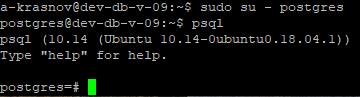
Autodoc для postgresql
Ставим приложение autodoc
$ sudo apt install libdbi-perl libhtml-template-perl libterm-readkey-perl libdbd-pg-perl$ git clone https://github.com/cbbrowne/autodoc.git$ cd autodoc$ sudo make install
Дальше запускаем скрипт
postgresql_autodoc -d cic-dev-db -h 192.168.17.111 -u postgres --password -t html -s core -f cic-dev-db-core
Примечание: схемы можно передать как
-s "core|dbo"
Исходный код: https://github.com/cbbrowne/autodoc
Обновление строки в postgresql
UPDATE dummySET customer=subquery.customer,address=subquery.address,partn=subquery.partnFROM (SELECT address_id, customer, address, partn FROM /* big hairy SQL */ ...) AS subqueryWHERE dummy.address_id=subquery.address_id;
UPDATE table T1SET column1 = T2.column1FROMtable T2INNER JOIN table T3 USING (column2)WHERE T1.column2 = T2.column2;
https://stackoverflow.com/questions/6256610/updating-table-rows-in-postgres-using-subquery
Заметка: работа с JSON в postgresql
Работая с JSON в postgresql заметил следующие момент:
select t.value::uuid
from json_array_elements_text('["e7ded0cd-12dd-47f5-a75b-192376291e83"]'::json) as t;

select (t.value #>> '{id}')::uuid
from json_array_elements('[{"id": "e7ded0cd-12dd-47f5-a75b-192376291e83"}]'::json) as t;
Две команды возвращают одинаковый результат, но разными способами.